SkinAssistGet the app

Know your skin. Choose what suits it.

SkinAssist scans your face and scores it area by area, builds a morning and evening routine from what it sees, and tells you how well any product’s ingredients suit your skin.

Download on the App Store

Free to download. Your first scan is free.For iPhone and iPad, iOS 17.4 or later.

On a computer? Point your iPhone camera at the code.
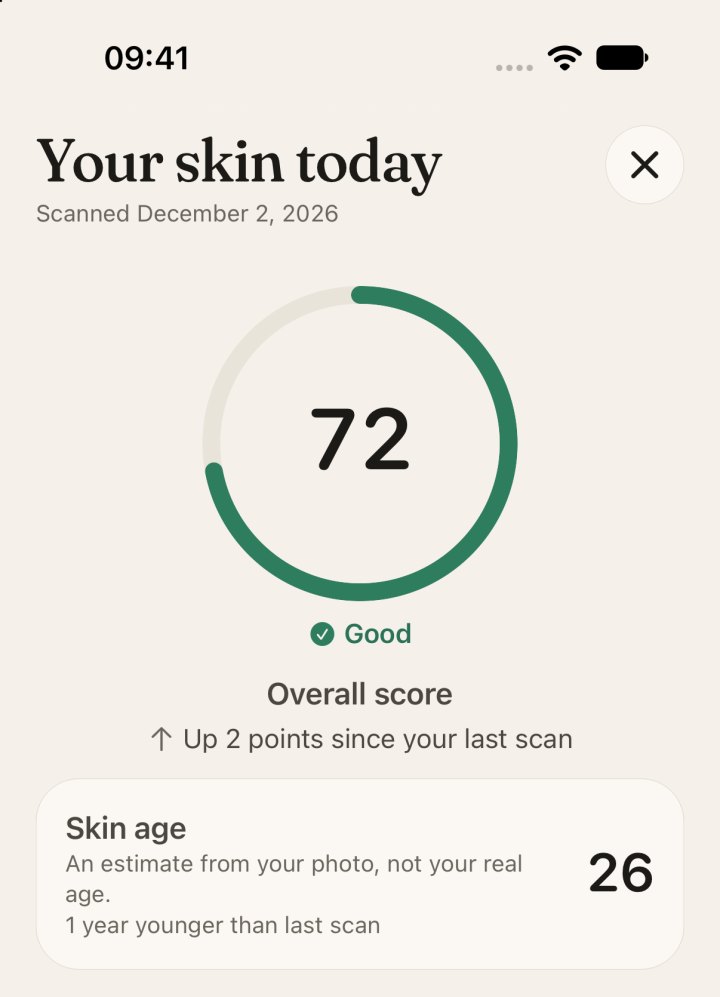
The SkinAssist app on an iPhone. Screen “Your skin today”: an overall score of 72, marked good, up 2 points since the last scan, and a skin age of 26.

What is SkinAssist?

SkinAssist is a skincare app for iPhone and iPad. It scans your face, keeps your daily routine, checks products against your skin and answers your questions.

It runs on iOS 17.4 or later, in English and Turkish, and is free to download. It is made by Furkan Sarıhan, an independent developer. It is not a medical device.

One scan, then a week of small steps

The app works in a weekly loop: scan your face, follow your routine, scan again and see what has moved.

See your skin, area by area

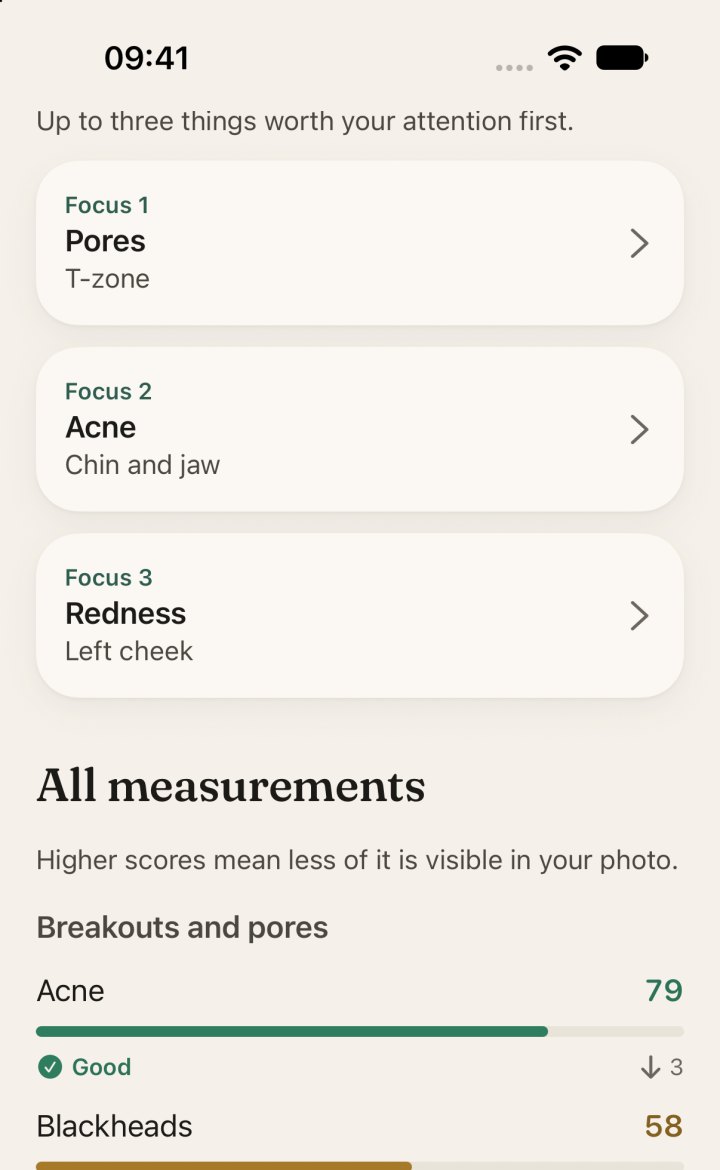
Take a front photo with a live guide for distance, light and angle, and add a photo of each side if you like. The result comes back for six areas of your face: forehead, T-zone, both cheeks, under the eyes, and chin and jaw.

You get an overall score, up to three focus areas worth your attention first, and fourteen measurements, from pores and redness to fine lines and dryness. For each area the app says what to do.

Your first scan is free and shows your overall score, skin age and top focus area. The full result is part of Premium.

App screen with three focus areas (pores on the T-zone, acne on the chin and jaw, redness on the left cheek) and the start of “All measurements”: acne 79, marked good.

A morning and evening routine you can keep

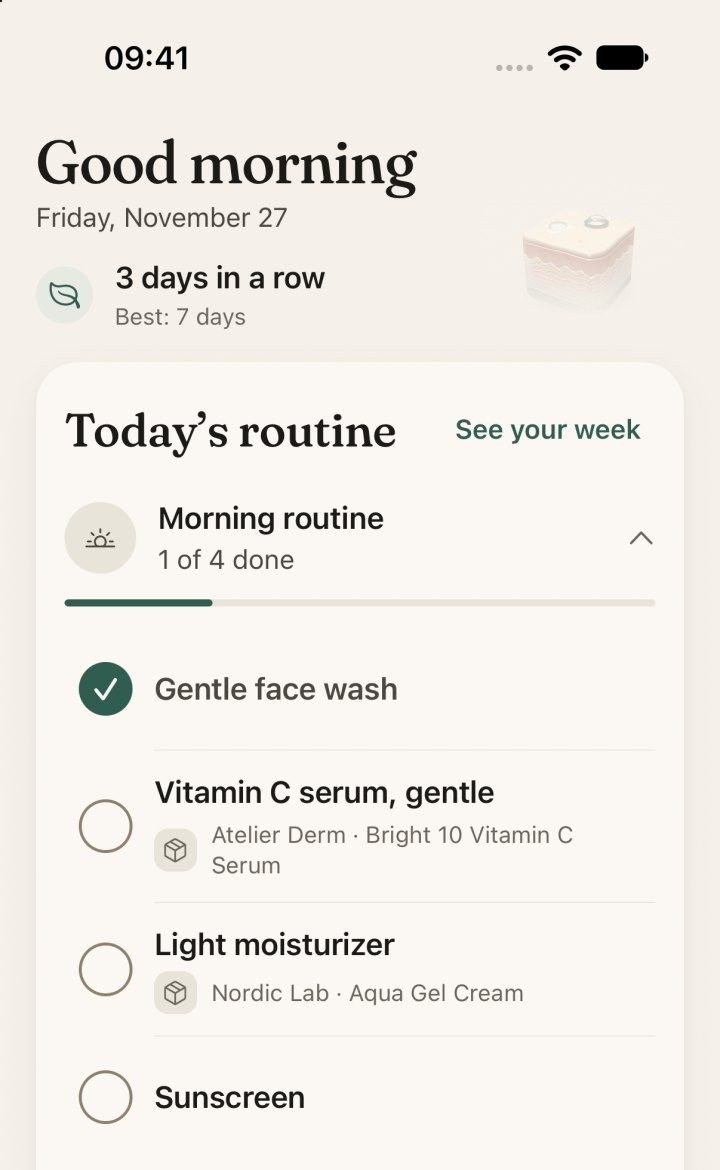
SkinAssist builds a morning and an evening routine from your answers and your scan. Each step can carry a product from your shelf.

Tick steps off as you go. A day counts toward your streak when most of its steps are done, and reminders arrive at the times you choose. The Today view also carries a daily card: a short tip, or a note when UV is high.

Viewing your routine, ticking steps off, the streak and reminders are free. Rebuilding the routine after each new scan is part of Premium.

App screen “Good morning”: three days in a row, and today’s morning routine with one of four steps done: gentle face wash, vitamin C serum, light moisturizer, sunscreen.

The same measurements, scan after scan

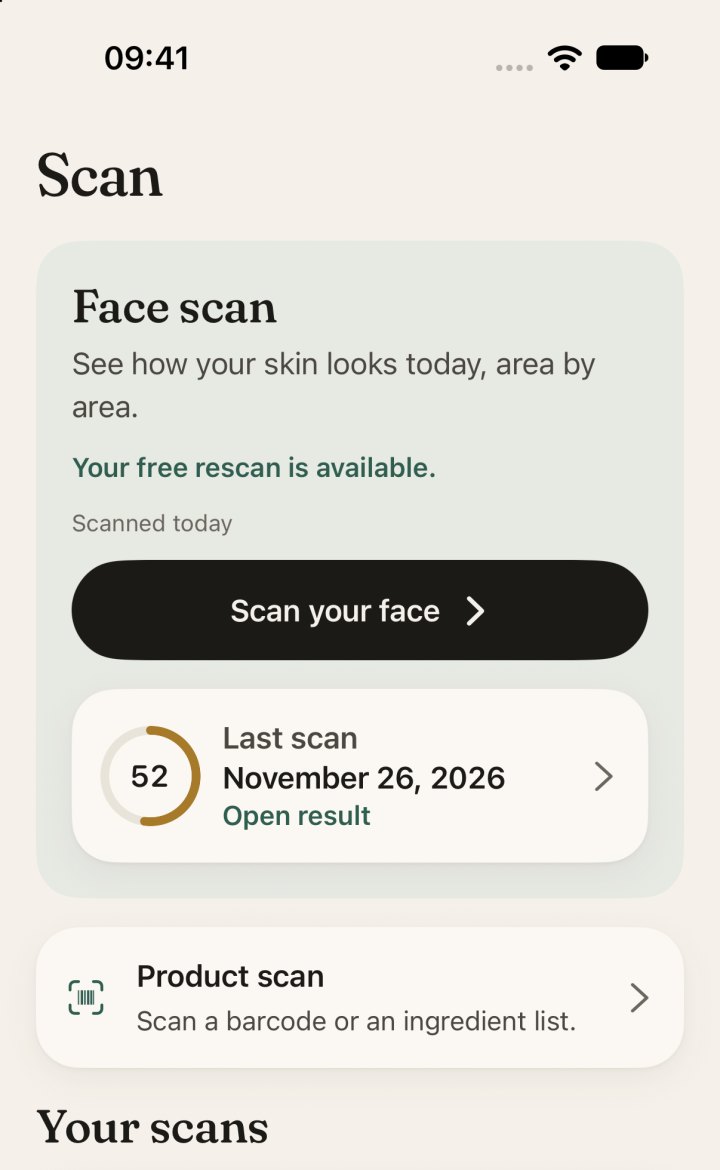
Scan again and each measurement shows how far it has moved since last time. Progress keeps your scans in order, with before and after side by side.

The app suggests a scan once a week. Light and make-up change what a photo shows, so for scans you can compare, use soft daylight and bare skin.

On the free plan a summary rescan opens after a waiting period, and you see your two most recent scans. Premium has no waiting time and keeps your whole history, with a trend for every measurement.

App screen “Scan”: a face scan card saying a free rescan is available, the last scan with its score, and a product scan row for barcodes and ingredient lists.

A coach that knows your skin

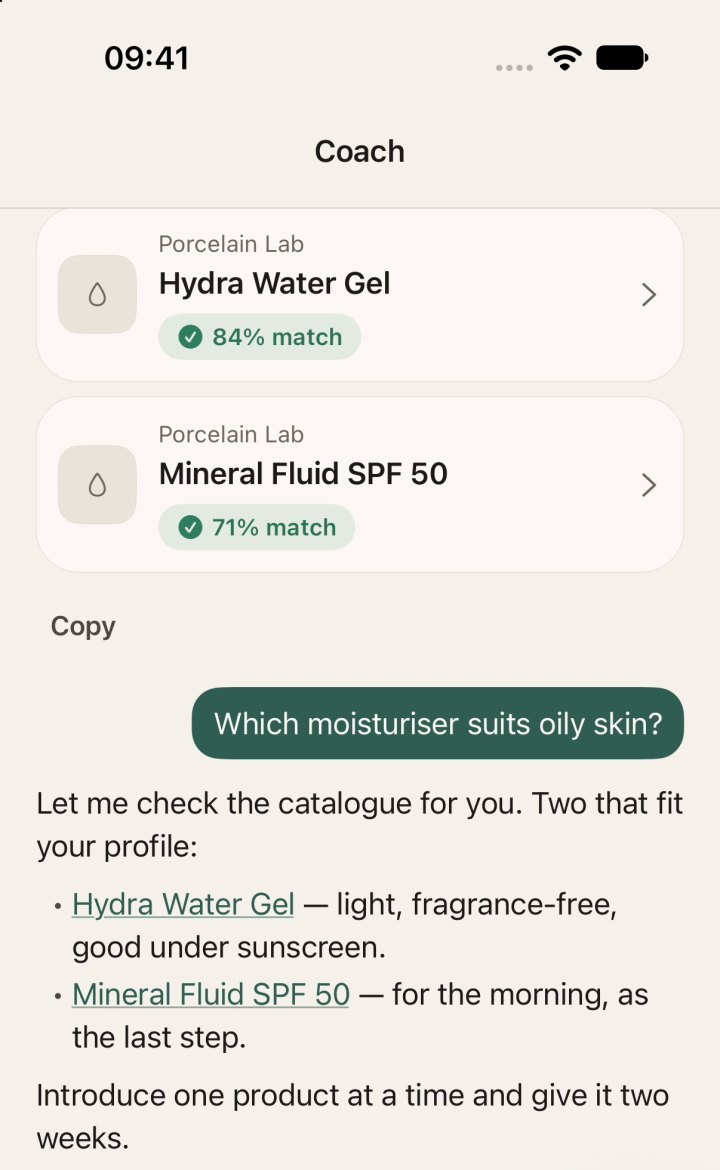
Ask about your skin or about a product. The coach answers with your profile, your latest scan, your routine and your shelf in view, and can point to products from the catalogue.

It is an AI and can make mistakes. It does not give medical advice, and it says so when something is better shown to a dermatologist.

A few messages a day are free. Premium has no daily limit.

App chat with the coach: two suggested products with match scores of 84% and 71%, the question “Which moisturiser suits oily skin?” and the start of the answer.

The screens on this page are from the app and show demo data. The products in them are made up.

What does a face scan measure?

Fourteen things, in six areas of your face.

  • Acne
  • Blackheads
  • Whiteheads
  • Pores
  • Redness
  • Dullness
  • Dark spots
  • Uneven texture
  • Fine lines
  • Wrinkles
  • Loss of firmness
  • Under-eye circles
  • Puffiness
  • Dryness

The six areasForehead, T-zone, left cheek, right cheek, under the eyes, and chin and jaw.

A higher score means less of it is visible in your photo. A scan is an observation from a photo, not a medical diagnosis.

Does it suit your skin?

SkinAssist compares a product’s ingredient list with your skin type, concerns and sensitivities, and gives a match score with its reasons: what works for you, what to watch, and what clashes with your routine.

Look a product up by name, or scan its barcode, the front of the pack or the ingredient list. The catalogue holds more than 27,000 products. If yours is not in it, a photo of the ingredient list is enough.

Search is free, and the free plan includes a few product scans a week. The match is a guide based on your profile, not medical advice.

Is it right for you?

72% match · GoodShould suit your combination skin; go gently with the salicylic acid.

  • 3 points that work for you
  • 2 points to watch
  • 1 clash with your routine
The match card as the app shows it, redrawn here with example data.

Free to start, Premium for all of it

Premium is an optional subscription. The App Store shows its price in your currency before you pay. Limits on the free plan are set in the app and can change.

Free

Enough to know your skin and keep a routine.

  • Face scanYour first scan: overall score, skin age and top focus area. Later, a summary rescan after a waiting period.
  • RoutineView it, tick steps off, keep a streak, get reminders.
  • ProgressYour two most recent scans.
  • ProductsSearch, a few scans a week and a summary of the match.
  • CoachA few messages a day.
  • ShelfA limited number of products.

Premium

Everything a scan finds, with no waiting.

  • Face scanEvery scan in full: 14 measurements, the face map and what to do for each area. No waiting time.
  • RoutineRebuilt after each scan, with a warning when products in it clash.
  • ProgressYour whole history, trend charts and a weekly report.
  • ProductsUnlimited scans, and the match explained ingredient by ingredient.
  • CoachNo daily limit.
  • ShelfNo limit, and a reminder before products expire.

It describes what a photo shows. It does not diagnose.

SkinAssist is not a medical device. Its scores and findings are general skincare information, not a diagnosis or a treatment. If your skin is painful, bleeding, spreading or changing quickly, please see a dermatologist.

What happens to my photos?

A scan uses a front photo of your face, and a left and a right side photo if you add them. You see them and confirm them before they are sent for analysis. You can delete a scan and its photos from your history, and delete your account in Settings.

What else does the app use?

What you tell it about your skin, the products you scan or save, and your messages to the coach. What is collected, why, and your rights are set out in the Privacy Policy.

Who makes SkinAssist?

Furkan Sarıhan, an independent developer. Support answers at [email protected].

Questions

What is SkinAssist?

SkinAssist is a skincare app for iPhone and iPad. It scans your face and reports on it area by area, builds a morning and evening routine, shows how well a product’s ingredients suit your skin, and has an AI coach for questions.

Is SkinAssist free?

It is free to download. The first face scan, your routine, the streak, reminders, the daily card and product search are free. Premium is an optional subscription that opens the full scan result, unlimited scans, your whole history and the coach without a daily limit.

Is the skin scan a medical diagnosis?

No. SkinAssist is not a medical device. A scan is an observation from a photo, and its scores and findings are general skincare information. For skin that is painful, infected or changing quickly, see a dermatologist.

What does the face scan measure?

Fourteen things: acne, blackheads, whiteheads, pores, redness, dullness, dark spots, uneven texture, fine lines, wrinkles, loss of firmness, under-eye circles, puffiness and dryness. Results are given for the forehead, T-zone, each cheek, under the eyes, and the chin and jaw.

How does the product match work?

SkinAssist compares a product’s ingredient list with your skin type, concerns and sensitivities, and with the products already in your routine. The result is a match score with reasons: what works for you, what to watch, and what clashes. It is a guide, not medical advice.

Which products are in the catalogue?

More than 27,000 skincare and personal care products, with their ingredient lists where we have them. If a product is missing, you can check it by photographing its ingredient list.

What happens to my photos?

A scan uses a front photo of your face, and a left and a right side photo if you add them. You confirm them before they are sent for analysis. You can delete a scan and its photos from your history. The Privacy Policy has the details.

Which devices and languages does it support?

SkinAssist runs on iPhone and iPad with iOS 17.4 or later, in English and Turkish. An earlier version of the app is on Google Play for Android.

Who makes SkinAssist?

SkinAssist is made by Furkan Sarıhan, an independent developer. You can reach support at [email protected].

More questions and answers

Your first scan is free.

It takes about a minute: a guided photo, then a result for each area of your face.

Download on the App Store

On Android, an earlier version is on Google Play.

On a computer? Point your iPhone camera at the code.